App for Construction Work: A Simple Guide to Better Field Labor Tracking

See how a construction work app helps crews track time, schedules, jobsite activity, payroll data, requests, and labor costs from one place.
Construction crews spend most of their day away from a desk. Workers move between jobsites, supervisors manage changing schedules, and office teams need accurate hours before payroll can run. When all this information lives on paper, spreadsheets, texts, and phone calls, small errors can quickly become bigger problems.
An app for construction work gives workers one place to check schedules, clock in and out, review hours, receive updates, and send requests from the field. Trayd, for example, connects worker activity with payroll and job costing, so the information recorded on the jobsite can flow into back-office processes.
For contractors, specialty trades, foremen, payroll teams, and field workers, the main value is simple: less manual work and clearer labor data.
What Is an App for Construction Work?
An app for construction work is a mobile tool designed for people working on active jobsites. Unlike general office software, a construction worker app focuses on daily field tasks such as time tracking, shift schedules, job assignments, attendance, communication, and labor records.
Workers can use their phones instead of filling out paper timecards at the end of the day. A modern app for construction work can also connect each clock-in with a job, task, or activity code. That gives the office better information about where labor hours were actually spent.
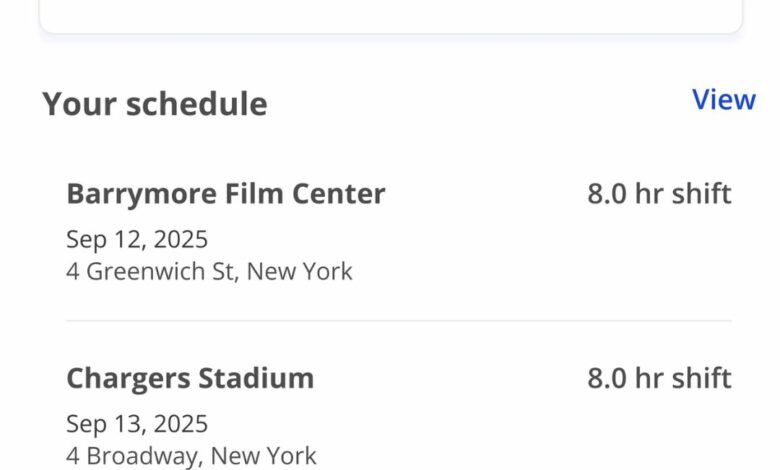
For example, Trayd lets workers view current and upcoming shifts, past work history, and messages from the office or foreman. Workers can also clock in from their phones, while location verification helps confirm that time was recorded from the jobsite.
This makes the app useful for construction companies with crews spread across several locations.
How an App for Construction Work Helps Field Crews
A good app for construction work should make daily tasks easier, not add another layer of admin. Workers should be able to open the app, see what they need to do, record their time, and get back to work.
Important worker features include:
- Mobile clock-in and clock-out: Workers record start and finish times from their phones.
- GPS verification: Location data can help confirm that a clock-in happened at the correct jobsite.
- Shift schedules: Workers can see where they are assigned and when they need to arrive.
- Jobsite updates: Schedule changes or messages can be shared without repeated calls.
- Time history: Employees can review previous shifts and recorded hours.
- Pay information: Some systems allow workers to see earnings, timesheets, and pay stubs.
- Field requests: PTO, sick leave, or reimbursement requests can be submitted digitally.
Trayd includes many of these functions in its worker app. Its system also allows task and activity codes to be connected to shifts, which improves labor tracking and job costing.
An app for construction work is especially helpful when crews move from project to project. Instead of trying to remember where six or eight hours were spent at the end of the week, workers can record time while the work is happening.
Why Construction Time Tracking Apps Improve Payroll Accuracy
Payroll errors often begin with poor field data. A worker forgets to record a break. A handwritten timesheet is hard to read. Hours are entered against the wrong job. Someone sends a correction after payroll has already started.
A construction time tracking app reduces these problems by capturing labor information at the source.
With Trayd, each clock-in can automatically create a timesheet entry. GPS verification, task codes, shift information, and working hours are captured as the crew works. Completed timesheets can then connect with payroll and job costing.
That matters because payroll and project costing depend on the same basic question: How many hours were worked, and where were they spent?
An app for construction work creates a cleaner path between the field and the office. Payroll teams spend less time chasing missing timecards, while project managers get more useful labor cost information.
Mobile timesheet systems are also useful for crews working across several jobsites because hours can be assigned to the correct project instead of being reconstructed later.
How an App for Construction Work Supports Scheduling
Construction schedules change often. Weather, materials, inspections, subcontractor delays, and project priorities can all affect where crews need to work.
When schedules are managed through phone calls and group texts, information can easily get missed.
An app for construction work gives each worker a clear place to check upcoming assignments. Trayd shows current and upcoming shifts directly in the worker app and can send updates from the office or foreman.
Clear scheduling helps because workers can quickly answer questions such as:
Where am I working tomorrow? What time does the shift start? Has my jobsite changed? What was my previous shift? Has my foreman sent an update?
When that information is available inside the construction worker app, office staff spend less time answering routine scheduling calls.
How Construction Work Apps Improve Job Costing
Job costing depends on knowing the real labor cost of each project. If labor hours are entered late or assigned to the wrong job, cost reports become less useful.
An app for construction work can connect each shift with the correct project and activity.
For example, a worker may spend four hours on framing and four hours on another task during the same day. When task or activity codes are available, those hours can be classified more accurately instead of being grouped into one general labor entry.
Trayd connects field time records with job costing and payroll, allowing labor information captured on the jobsite to flow into back-office reporting.
This gives contractors a clearer picture of actual labor use while reducing duplicate data entry.
What to Look for in an App for Construction Work
Not every construction app serves the same purpose. Some focus on project management, while others are built mainly for worker time, payroll, safety, documents, or field reporting.
For field labor management, look for an app for construction work that keeps the worker experience simple.
Useful features include GPS-based time tracking, job and task codes, worker schedules, timesheet history, payroll connections, field requests, crew messages, and job costing support.
The app should also fit the way your crews already operate. A complicated platform may have many features but still fail if workers cannot clock in quickly.
The best field app reduces steps. A worker should not need to complete several screens just to record a normal shift.
Frequently Asked Questions
What is the best app for construction workers?
The best app depends on the job. For field labor tracking, look for an app for construction work that supports mobile clock-ins, schedules, timesheets, job codes, worker communication, and payroll integration. Construction-specific systems are usually more useful than general time tracking apps because they are designed around jobsites and field crews.
How do construction workers track their hours?
Construction workers can track hours using mobile time tracking apps. Workers clock in when a shift starts and clock out when it ends. Some systems also use GPS verification, jobsite information, task codes, and digital timesheets to create more accurate labor records.
Can construction workers clock in using GPS?
Yes. Some construction worker apps use location verification when an employee clocks in or out. Trayd uses GPS-based verification to help confirm that recorded time comes from the jobsite.
Can construction workers see their schedules on an app?
Yes. An app for construction work can display current and upcoming shifts so workers know where and when they are expected to work. Some apps also send schedule updates and messages from supervisors or office teams.
Can a construction app connect timesheets with payroll?
Yes. Construction labor apps can send approved or completed time records into payroll workflows. Trayd connects worker timesheets with construction payroll, reducing the need to manually re-enter time information.
Why should contractors use a construction worker app?
Contractors can use a construction worker app to reduce paperwork, improve time accuracy, manage schedules, track labor by job, and give workers better access to their records. It also creates a clearer connection between field activity, payroll, and job costing.
Conclusion
A reliable app for construction work helps close the gap between the jobsite and the back office. Workers can see schedules, record hours, receive updates, check time records, and submit requests from their phones. Office teams receive cleaner labor data without relying on handwritten forms or end-of-week reconstruction.
For contractors managing several crews or jobsites, the biggest benefit is better information. When every shift is linked to the right worker, location, job, and task, payroll becomes easier to manage and job costing becomes more accurate.
An app for construction work should ultimately remove admin from the field, not create more of it. Simple mobile time tracking, clear schedules, accurate timesheets, and connected payroll data give workers and construction teams a more practical way to manage daily labor.