Complete Guide to Server Memory in IT Systems

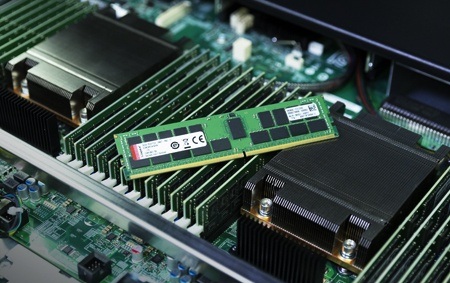
In modern IT hardware and computer hardware, server memory plays a critical role in ensuring system performance, reliability, and scalability. Server memory is responsible for temporarily storing data that processors need for fast access. Without sufficient and reliable server memory, even the most powerful servers cannot perform efficiently.
From enterprise data centers to cloud computing platforms, server memory forms the backbone of digital infrastructure. It supports databases, virtual machines, web applications, and enterprise software systems. As organizations increasingly depend on digital services, the importance of high-quality server memory continues to grow.
What Is Server Memory?
Server memory, commonly referred to as RAM (Random Access Memory), is a high-speed storage component used by servers to store active data and running applications. Unlike permanent storage devices such as hard drives or SSDs, server memory is volatile, meaning it loses data when power is turned off.
In computer hardware, server memory allows processors to access information quickly, reducing delays and improving response time. This makes it a vital component in environments where speed, reliability, and continuous operation are essential.
Types of Server Memory
DDR Server Memory
DDR (Double Data Rate) memory is the most common type of server memory used in modern systems. Each new generation, such as DDR3, DDR4, and DDR5, offers higher speeds and improved efficiency.
In IT hardware environments, DDR memory helps servers process large volumes of data quickly, making it suitable for cloud computing, virtualization, and enterprise applications.
ECC (Error-Correcting Code) Memory
ECC memory is specially designed server memory that detects and corrects data errors automatically. This feature is crucial in mission-critical systems where data accuracy is essential.
In professional computer hardware systems, ECC memory prevents system crashes, data corruption, and unexpected failures, ensuring stable and reliable performance.
Registered and Buffered Memory
Registered (RDIMM) and buffered memory are advanced types of server memory used in high-capacity servers. These memory modules reduce electrical load on the memory controller, allowing systems to support larger memory capacities.
Such memory solutions are commonly found in enterprise-level IT hardware setups, including database servers and virtualization platforms.
Role of Server Memory in IT Hardware
In modern IT hardware infrastructure, server memory supports a wide range of functions. It enables servers to run multiple applications simultaneously, manage databases, and support virtual environments.
High-performance server memory ensures smooth operation of business systems, minimizes downtime, and improves overall productivity. Without adequate memory resources, servers may experience slow performance, crashes, or system instability.
Importance of Server Memory in Computer Hardware
In computer hardware, server memory acts as a bridge between processors and storage devices. It provides temporary storage for frequently used data, allowing CPUs to access information without delays.
For enterprise systems, sufficient server memory is essential for handling heavy workloads such as analytics, cloud services, and artificial intelligence applications. More memory means better multitasking and faster processing speeds.
Benefits of High-Quality Server Memory
Investing in high-quality server memory offers several advantages:
-
Improved system performance
-
Faster application response
-
Better multitasking capabilities
-
Enhanced data reliability
-
Reduced system downtime
In IT hardware environments, reliable server memory improves user experience and ensures uninterrupted business operations.
Server Memory and Virtualization
Virtualization is widely used in modern computer hardware systems to run multiple virtual machines on a single server. Each virtual machine requires dedicated memory resources to function properly.
Adequate server memory allows organizations to maximize server utilization, reduce hardware costs, and improve operational efficiency. Without sufficient memory, virtual environments may experience performance bottlenecks.
Server Memory in Cloud Computing
Cloud computing platforms rely heavily on advanced server memory solutions. Cloud service providers use high-capacity memory systems to support thousands of users simultaneously.
In IT hardware data centers, optimized server memory enables fast data processing, smooth application delivery, and reliable service availability. It also helps in managing large-scale workloads efficiently.
Impact of Server Memory on Performance
The amount and speed of server memory directly affect system performance. Insufficient memory can lead to frequent data swapping between RAM and storage drives, slowing down operations.
High-speed server memory reduces latency, improves database performance, and enhances application responsiveness. In computer hardware environments, this leads to faster workflows and increased productivity.
Choosing the Right Server Memory
Selecting the right server memory depends on system requirements and workload demands. Key factors to consider include:
-
Memory capacity
-
Speed and frequency
-
ECC support
-
Compatibility with motherboard and CPU
-
Power consumption
For enterprise IT hardware, choosing compatible and scalable memory solutions ensures long-term system stability and performance.
Maintenance and Monitoring of Server Memory
Regular maintenance of server memory is essential for preventing system failures. Monitoring tools can detect memory errors, overheating, and performance issues.
In professional computer hardware environments, proactive maintenance helps identify potential problems before they affect operations. Replacing faulty memory modules on time prevents data loss and system crashes.
Future Trends in Server Memory Technology
The future of server memory is driven by innovation and growing data demands. Emerging technologies such as DDR5, persistent memory, and memory-centric computing are transforming IT infrastructure.
Advanced IT hardware systems will increasingly rely on intelligent memory management, higher bandwidth, and energy-efficient designs. These developments will support next-generation applications such as AI, big data, and real-time analytics.
Server Memory for Business Applications
Businesses depend on server memory to run critical applications such as ERP systems, CRM platforms, and financial software. These applications require fast and reliable access to data.
In computer hardware environments, optimized memory configurations improve business continuity, reduce downtime, and enhance customer satisfaction. Reliable server memory ensures smooth day-to-day operations.
Security and Server Memory
Security is another important aspect of server memory management. Memory vulnerabilities can expose sensitive data to cyber threats.
Modern IT hardware systems use encryption, access controls, and secure firmware to protect memory resources. Implementing proper security measures ensures data integrity and compliance with industry regulations.
Conclusion
In conclusion, server memory is a fundamental component of modern IT hardware and computer hardware systems. It plays a vital role in system performance, reliability, and scalability. From virtualization and cloud computing to enterprise applications and data analytics, server memory supports every aspect of digital infrastructure.
Understanding different types of server memory, their benefits, and their impact on system performance helps organizations make informed decisions. Investing in high-quality and compatible memory solutions ensures long-term stability, efficiency, and productivity.
As technology continues to evolve, server memory will remain at the heart of innovation, enabling faster, smarter, and more reliable computing environments for businesses worldwide.